AGEBasic and the Internet Archive

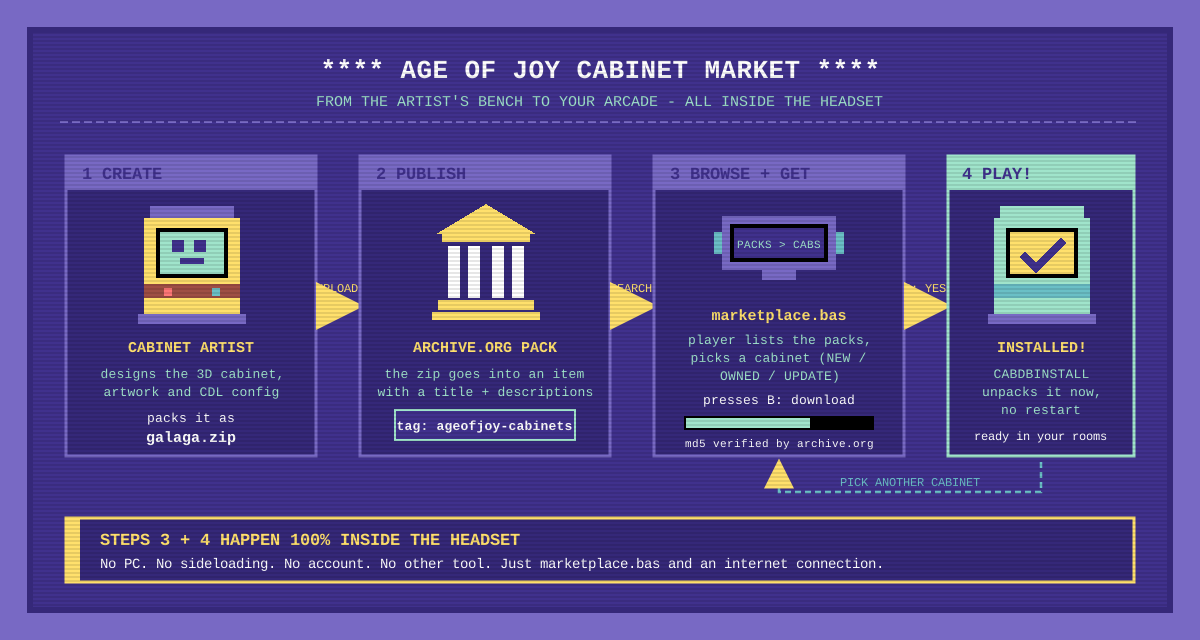
You as a Cabinet Artist can publish your cabinets on the Internet Archive (archive.org) so other players can download them, and an AGEBasic program (see below) can list, download and install them from the headset. The players don’t need an archive.org account.
You upload your cabinet .zip files to an archive.org item and share the item’s identifier (for example cabinet-pack-1-1) or its address (https://archive.org/details/cabinet-pack-1-1).
Everything on archive.org is public and nearly permanent.
Only upload what you have the right to share. Never put ROMs inside the cabinet zips. If archive.org takes an item down, it disappears for everyone.
Naming rules
| What | Rule | Example |
|---|---|---|
| Item identifier | Lowercase letters, digits and -. Chosen once, it can’t be changed. Unique in all archive.org. | ageofjoy-curif-pack-1 |
| Cabinet file | One .zip per cabinet, lowercase letters, digits, - and _, no spaces. | galaga.zip |
| Cabinet description (optional) | A custom metadata field named after the cabinet (without .zip). The value is the description. | field galaga = The standard Galaga cabinet |
Upload with the website
- Log in at archive.org and click Upload.
- Drag the cabinet zips.
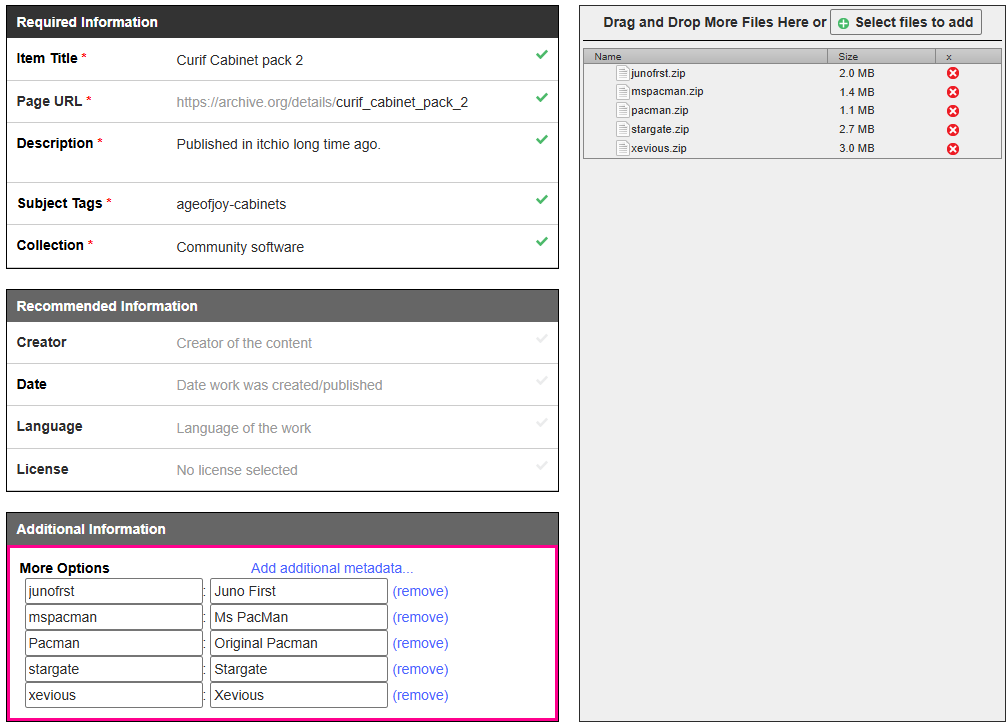
- Fill the form: Page URL (the identifier), Title, Description, subjects
ageofjoy-cabinets(see Get your pack listed), media type Software. - In Add additional metadata, add one row per cabinet: field name
galaga, value with the description. - Click Upload and Create Your Item and wait: archive.org processes the item in the background, it can take minutes or hours.
To update the pack later use Edit item: add files, replace a cabinet by uploading a file with the same name, delete files or edit the descriptions. The players keep using the same identifier.
Get your pack listed
Add the subject tag ageofjoy-cabinets to your item and players find it automatically, with no registration: a program lists every tagged pack with IASearch. For an existing item use Edit item → Subject tags.
archive.org’s search updates minutes to hours after the change, so a new pack may take a while to appear. To check, open this address in a browser, your item must be in the list:
https://archive.org/advancedsearch.php?q=subject%3A%22ageofjoy-cabinets%22&fl[]=identifier&output=json
Check your pack
Open https://archive.org/metadata/<identifier> in a browser. You should see every zip in "files" and your descriptions inside "metadata". If there is a "pending_tasks" entry archive.org is still processing the item; "is_dark": true means it was taken down.
Use a pack from AGEBasic
Functions: IASearch and IAPacks (find the packs), IALoad, IAStatus, IAInfo, IACabs, IACabInfo, IADownload, IADownloadStatus and IADownloadProgress, plus CabDBInstall and CabDBInstallStatus to install a downloaded cabinet. They are explained, with an example, in Internet Archive and downloads.
A downloaded cabinet is checked against the md5 that archive.org publishes, and it is installed the next time you start Age of Joy, or right away from your program with CabDBInstall (see Installing a downloaded cabinet). Packs published on itch.io are listed in Cabinet packs.
The Cabinet Market: get cabinets from inside the headset
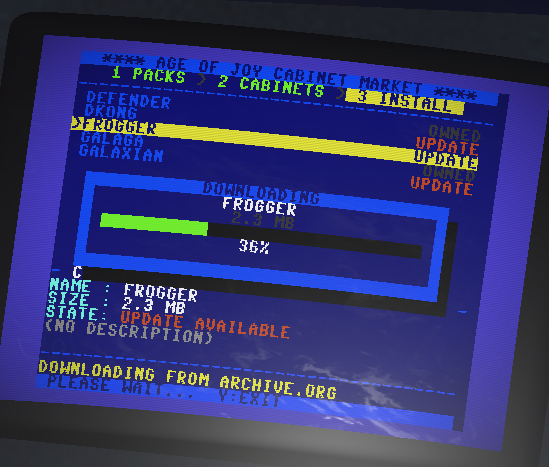
marketplace.bas is an AGEBasic program that lets you find, download and install cabinets from the Internet Archive directly in your headset, with no PC, no sideloading and no restarting. It lists every pack tagged ageofjoy-cabinets (see Get your pack listed), so a pack you publish shows up there automatically.
It is a full-screen program with a Commodore 64 look. A breadcrumb at the top shows where you are: 1 PACKS > 2 CABINETS > 3 INSTALL.
Controls
| Button | Action |
|---|---|
| Joypad Up / Down | Move the selection |
| Joypad Left / Right | Previous / next page of the list |
| B | Open the pack, download the cabinet, confirm the install, continue, or retry after an error |
| A | Go back to the packs, or refuse the install |
| Y | Leave the market |
Step by step
-
Search. The market asks archive.org for all the packs and reads each one (“READING PACK 3 OF 8”). You need an internet connection; if the search fails, press B to retry.
-
Packs. Pick a pack. You see its title, how many cabinets it has and its description. Packs shown in red are not available (archive.org is still processing them, or they were taken down). Press B to open one.
-
Cabinets. Each cabinet shows its size and description and a tag:
NEW: you don’t have it yet.OWNED: you already have this exact version.UPDATE: you have an older version and a newer one is available.
Press B on the one you want.
-
Download. A progress bar shows the download. The file is checked against the md5 that archive.org publishes, so a corrupt download is never kept.
-
Install. When the download finishes the market asks
INSTALL <cabinet>?. Press B to install it, you will seeINSTALLED!and the cabinet is ready to use in your rooms. Press A to refuse: the downloaded file is discarded. -
Press B on the result screen to pick another cabinet, or Y to exit.
Publishing for the market
Give your pack a descriptive Title and short descriptions: those are the texts the player reads in the market. To publish an update of a cabinet, upload a zip with the same name; players with the old version will see
UPDATE. A new pack can take minutes or hours to appear because archive.org’s search is not instant.
For developers
The market only uses the functions described above (
IASearch,IAPacks,IALoad,IAStatus,IAInfo,IACabs,IACabInfo,IADownload,IADownloadStatus,IADownloadProgress,CabDBInstall,CabDBInstallStatus), so you can read it as a complete working example of them.